
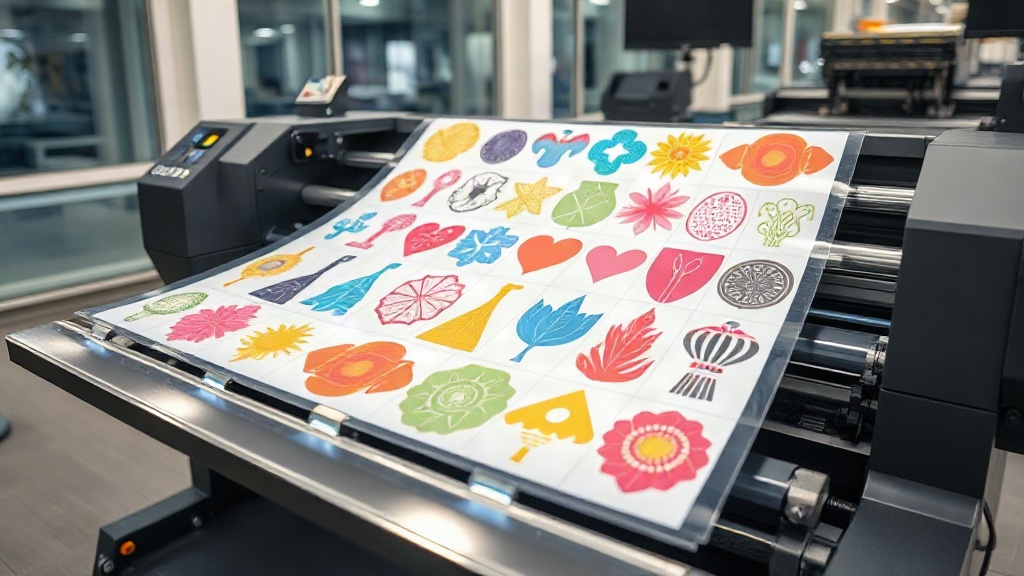
If you're in the custom apparel business, you've likely heard about DTF printing. It's a game-changer for producing vibrant, durable transfers on demand. But did you know that you can multiply your efficiency by using a DTF gangsheet? This guide will walk you through everything you need to know about gang sheets, from the basics to pro-level strategies, so you can maximize your profits and minimize waste.
What is a DTF Gangsheet?
A DTF gangsheet is a single sheet of DTF film that contains multiple designs arranged together. Instead of printing one design at a time, you consolidate many jobs onto one sheet, then press them all at once. This approach saves time, reduces film waste, and lowers ink consumption. Whether you're a small shop or a large operation, gang sheets can dramatically improve your workflow.
Why Use a Gangsheet?
Time is money. With a DTF gangsheet, you can print dozens of transfers in a single pass. That means fewer printer runs, less monitoring, and more time for other tasks. Plus, by optimizing the layout, you use less film and ink, cutting your cost per transfer. It's a win-win for your bottom line.
How to Create a DTF Gangsheet
Creating a gang sheet is straightforward if you follow these steps:
- Gather your designs: Collect all the images you need to print. Make sure they are high resolution (300 DPI) and properly sized.
- Choose your gang sheet size: Common sizes are 13x19 inches, 22x24 inches, or custom sizes to fit your printer. Consider how many designs you can fit without wasting space.
- Arrange designs efficiently: Use design software like Photoshop, Illustrator, or dedicated gang sheet builders. Nest designs closely, leaving a small gap (0.1-0.2 inches) between them for easy cutting.
- Add registration marks: These help align the film during pressing. Some printers require them; check your printer's guidelines.
- Print and cure: Print on DTF film using your DTF printer, apply hot melt powder, and cure according to your powder's instructions.
Tools and Software for Gang Sheets
You don't need expensive software to get started. Many DTF printers come with RIP software that includes gang sheet functionality. Alternatively, you can use online gang sheet builders like Gang Sheet Builder or DTF Pro's own tool (if available). For manual layout, Adobe Photoshop or Illustrator works well, but ensure you set the correct color mode (CMYK or RGB depending on your printer) and resolution.
Benefits of Using DTF Gangsheets
The advantages go beyond just saving time. Here's a closer look:
- Cost efficiency: By maximizing the use of each sheet, you reduce waste and lower your cost per transfer.
- Increased productivity: Print multiple orders in one go, perfect for bulk orders or popular designs.
- Consistency: All transfers on a sheet are printed under the same conditions, ensuring uniform quality.
- Versatility: You can mix different designs, sizes, and even different fabrics (cotton, polyester, blends) on one sheet.
Common Mistakes to Avoid with DTF Gangsheets
Even seasoned printers make mistakes. Here are pitfalls to watch out for:
- Overcrowding: Packing designs too tightly can cause ink bleeding or difficulty cutting. Leave adequate space.
- Inconsistent sizing: Double-check that each design is the correct size. A small error can ruin a whole sheet.
- Ignoring film orientation: DTF film has a printable side; printing on the wrong side wastes materials.
- Incorrect powder application: Too much or too little powder affects adhesion and durability.
- Skipping test prints: Always do a small test to check colors and adhesion before committing to a full gang sheet.
Advanced Tips for DTF Gangsheet Optimization
Ready to take your gang sheet game to the next level? Try these expert strategies:
- Nesting software: Invest in nesting software that automatically arranges designs for minimal waste. This is especially useful for irregular shapes.
- Batch by color: If you have designs with similar color profiles, group them to reduce ink changes and improve color consistency.
- Use roll film: For high-volume production, consider a DTF printer that uses roll film. You can create continuous gang sheets, cutting down on sheet handling.
- Pre-treat garments: For best results, pre-treat garments (especially cotton) to enhance adhesion and wash durability.
- Track your costs: Keep a log of film, ink, and powder usage per gang sheet to accurately price your transfers.
Frequently Asked Questions
What is the maximum size for a DTF gangsheet?
The maximum size depends on your printer. Common DTF printers support sheets up to 13x19 inches or 22x24 inches. Some industrial printers can handle roll film for continuous printing, effectively unlimited length.
Can I mix different designs on one gangsheet?
Absolutely! That's the beauty of gang sheets. You can combine any designs, as long as they fit and are properly spaced. Just ensure all designs are compatible with the same powder and curing settings.
How do I price DTF transfers from a gangsheet?
Calculate your total cost per sheet (film, ink, powder, labor) and divide by the number of transfers. Add your desired profit margin. Keep in mind that larger orders may warrant discounts.
Do I need special software to create a gangsheet?
Not necessarily. Basic design software like Photoshop or free online tools can work. However, dedicated gang sheet builders or RIP software can automate the process and reduce errors.
What's the shelf life of a DTF transfer?
When stored properly in a cool, dry place away from direct sunlight, DTF transfers can last up to 6 months or more. Always follow the manufacturer's recommendations.
Conclusion
Mastering the DTF gangsheet is a skill that pays off. By implementing the tips in this guide, you'll streamline your production, cut costs, and deliver high-quality transfers that keep customers coming back. Start small, experiment with layouts, and soon you'll wonder how you ever managed without gang sheets. Happy printing!